
Excellent icon editor with professional tools
Greenfish Icon Editor Pro is a professional tool to create and edit icons for your system. You can use it to design icons for your own programs or edit the ones already featured in any application.
Besides opening icons themselves, Greensfish Icon Editor can work with other graphic formats as well, and even convert these images into icons. The program also features an extracting tool to open all icons included in system libraries and EXE files.
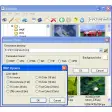
You'll have access to a wide variety of drawing tools and special filters to spice your icons up. Plus, the program is really easy to use and supports keyboard shortcuts, drag-and-dropping files and other goodies. You'll only need to arrange the different windowed menus on the interface, and you're ready to start working on your icons.
An excellent editor with which you can easily create professional-looking icons.































User reviews about Greenfish Icon Editor Pro
by Anonymous
Greenfish makes working with images a joy instead of a problem..
It's excellent. I do yearbook and Greenfish has been a gift.
Pros: Working with backgrounds.
Cons:
Nothing so far. More
by Sandra Cardoso
Great icon editor..
It has all the tools I need to create and edit my icons. And it is very easy and intuitive to use.
by Anonymous
Nice tool, but.........
Easy going tool to create icons.
Pros: But if you want to save it in one of the provides formats, such as jpg it will not do so. As a result you have saved it as a picture file with no chance to open it as such. Disappointing, as it cannot be identified and used. Maybe a programme error. More